Know your winners and losers
Revenue tells you what sells. Margin tells you what's worth selling. The Products page ranks every product and variant by gross profit, so you can find the SKUs silently draining your margin — and the ones worth scaling.
For DTC brands with a catalogue wide enough that the revenue ranking and the true profit ranking are no longer the same list.
Starter+ · Available on every paid plan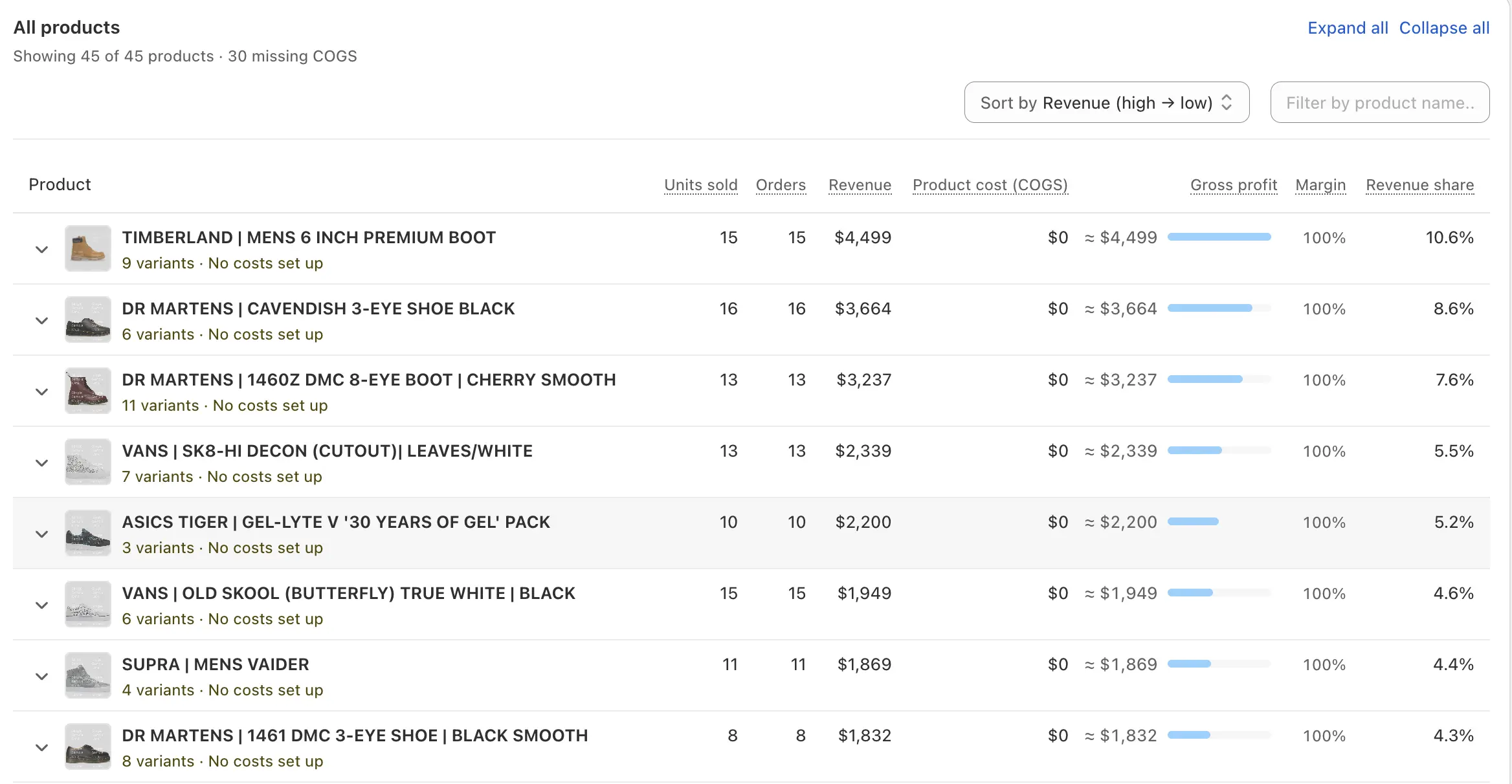
Read the table in 10 seconds, not 10 minutes
Every product is color-coded by margin tier: green for high margin (above 50%), blue for healthy (40-50%), amber for watch (20-40%), red for low or negative (below 20%). You don't need to scan numbers to find problems — the colors do the work. Sort by margin, scan the column, and the red rows jump out.
Sort by margin to find your worst performers. Sort by gross profit to find your biggest contributors. Sort by revenue to see your bestsellers. Every column is sortable, every product is searchable, and the tier badge stays consistent so you can always read the health at a glance.
Click any product, see every variant
Products with variants show an expand chevron. Click it and the row expands inline to show every size, color, or option with its own units, revenue, COGS, profit, and margin. A product might look healthy at 62% margin overall — but Size XXL could be at 28% because the COGS on that size is higher. Without variant-level data, you'd never know.
This is the level of detail you need to answer questions like: "Should we discontinue XXL in this color?" or "Is the bundle variant actually more profitable than buying items individually?" Variant-level COGS, variant-level margins, variant-level decisions.
Costs change. Your margin numbers should reflect that.
Supplier prices change. You renegotiate a deal in March, switch manufacturers in July, take an FX hit in October. NetNet lets you set multiple cost periods per variant with start and end dates. Past orders use the cost that was active when they were placed; new orders use the current cost. Your historical margins stay accurate.
Bundles get their own COGS rule too. Define a bundle as a list of component products with quantities, and the bundle's COGS is calculated from the components. Or override the bundle COGS entirely with a single number. Either way, bundle margins reflect reality — not the sum of MSRPs.
Every question your spreadsheet can't answer fast
The product table isn't decoration — it's the answer to questions you'd otherwise be in a spreadsheet for an hour to figure out. Every column, sort, and filter exists because merchants kept asking.
“Which products are silently losing money?”
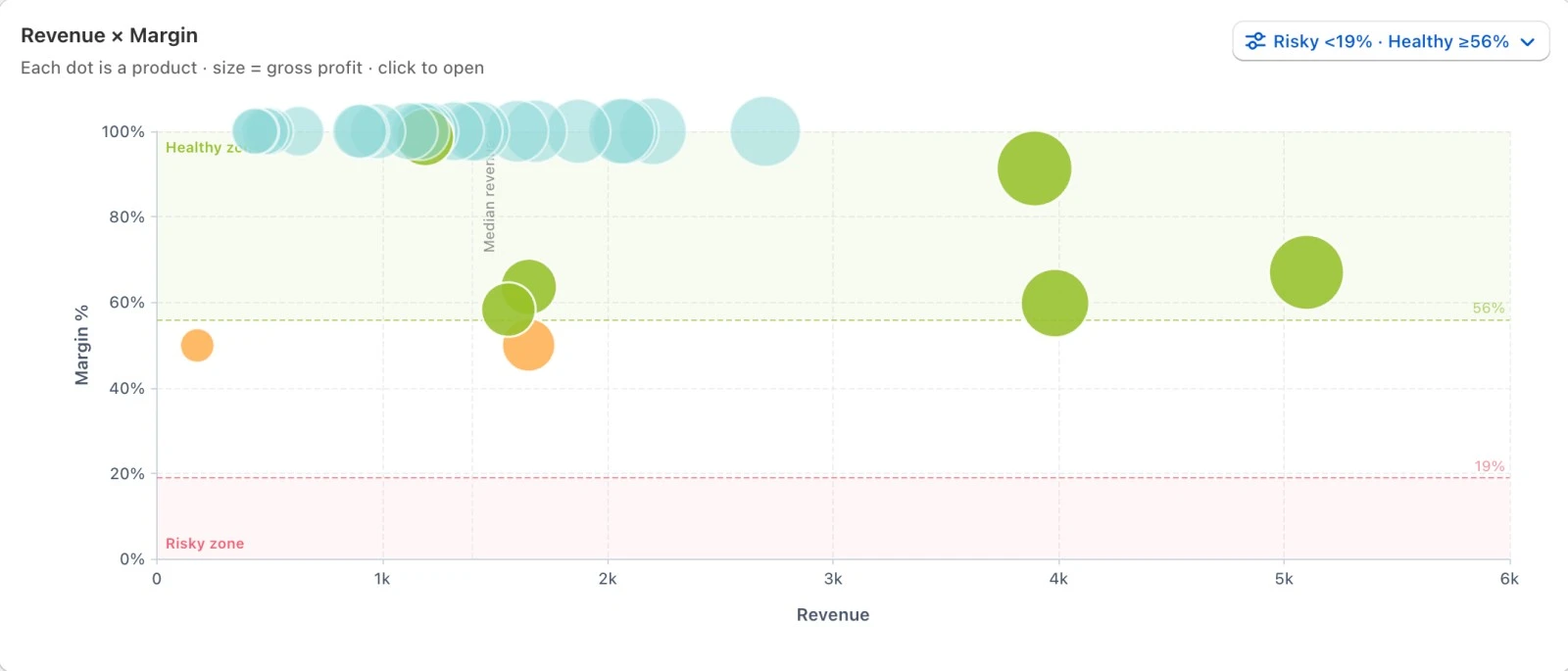
Sort by margin ascending — red and amber tiers float to the top. Filter to 'Missing COGS' to find products with no cost configured (their profit is overstated).
“Which variants are dragging the average down?”
Click the chevron on any multi-variant product. The variant table shows each size or color with its own margin — find the XXL that's at 28% while the M and L are at 70%.
“Did the recent supplier price increase wreck any margins?”
Set a new cost period with the new price and an effective date. Past orders keep the old margin; new orders show the impact. Sort by current margin to see what's now in the red.
“Are our bundle margins what we think they are?”
Bundles get either a calculated COGS (sum of components × quantities) or an override. Check the bundle row to see if margin reflects the real component cost — not the sum of MSRPs.
“Which products are worth scaling?”
Sort by gross profit descending. The top of the list is your contribution leaders. Sort by margin descending and the highest-margin products (above 50%) are the ones where every extra unit sold adds disproportionately to profit.
“What's the impact of our discount on per-product margin?”
Revenue on this page is discount-adjusted. The margin shown is what you actually keep after promotions — not list-price margin. Run a sale, see real per-product impact.
Top performers, watch list, gaps
NetNet flags products that need attention
You shouldn't have to scan every row to find problems. The Products page surfaces issues automatically — products with missing COGS, products whose margin dropped after a cost change, products with negative profit on a recent order.
23 products with missing COGS
Configure cost on these products to surface their real margin — currently their profit reads as 100% of revenue.
Sample Pack went negative
After the latest shipping rule update, this SKU is at -3% margin. Review pricing or COGS configuration.
Pro Jersey XXL margin dropped
Margin moved from 38% to 28% over the last 30 days. Possible supplier cost increase — check the cost periods page.