Four layers of profit, separated cleanly
Most profit trackers give you one number: gross profit. That's not enough. A product can look profitable after COGS but become a loss-maker once you add shipping, payment fees, and ad spend. NetNet's P&L breaks profit into four layers — each answers a different question about your business.
For DTC operators who need a profit statement built for deciding things, not for filing them.
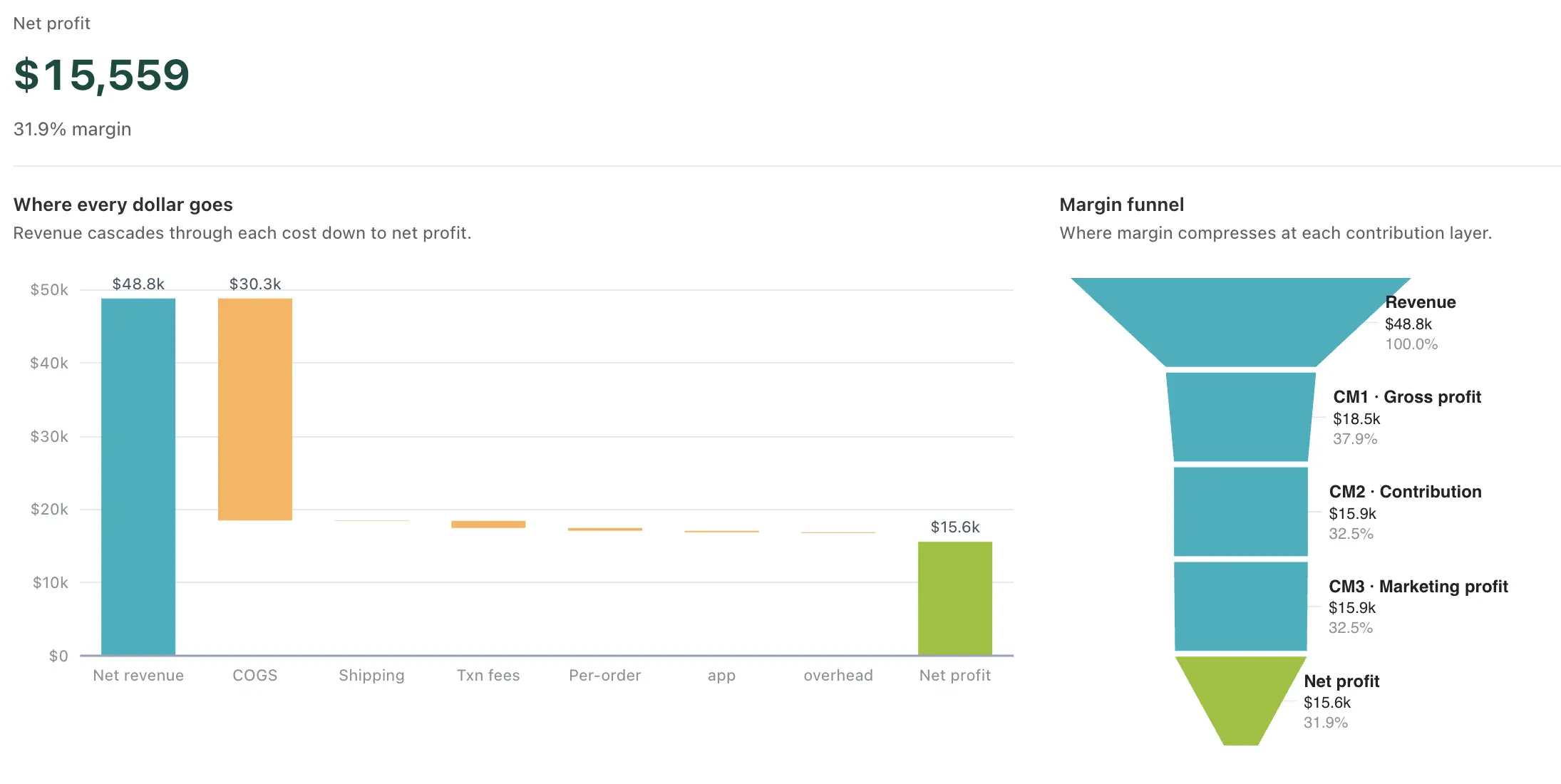
Four questions, four layers
Every P&L in NetNet cascades from revenue through four profit layers. Each layer subtracts a different category of cost, so you see exactly where money goes — and where profit leaks. Most competing tools stop at gross profit. NetNet goes three layers deeper.
“Is my pricing right?”
Revenue minus COGS and refunds. The first test of your business. Below 40% for most categories, no amount of optimization downstream will save you. Per order and per product so you can see which SKUs are pulling the average down.
“Is each order worth fulfilling?”
Gross profit minus shipping, payment gateway fees, transaction fees, and taxes. The layer most merchants have never seen. An order with 50% gross margin can drop to 15% CM after $12 in shipping, $4.50 in Stripe fees, and $8 in tax. Some go negative.
“Are my ads actually making money?”
Contribution margin minus ad spend across your connected ad channels. This is where POAS (Profit on Ad Spend) lives. A 4× ROAS campaign can be a 0.8× POAS once COGS, shipping, and fees come out — you spend $1 to lose $0.20.
“What do I actually keep?”
Marketing profit minus fixed overheads — rent, salaries, software, accounting. The real number. The one that determines whether your business is sustainable. Everything above CM4 is academic. CM4 is what hits your bank account.
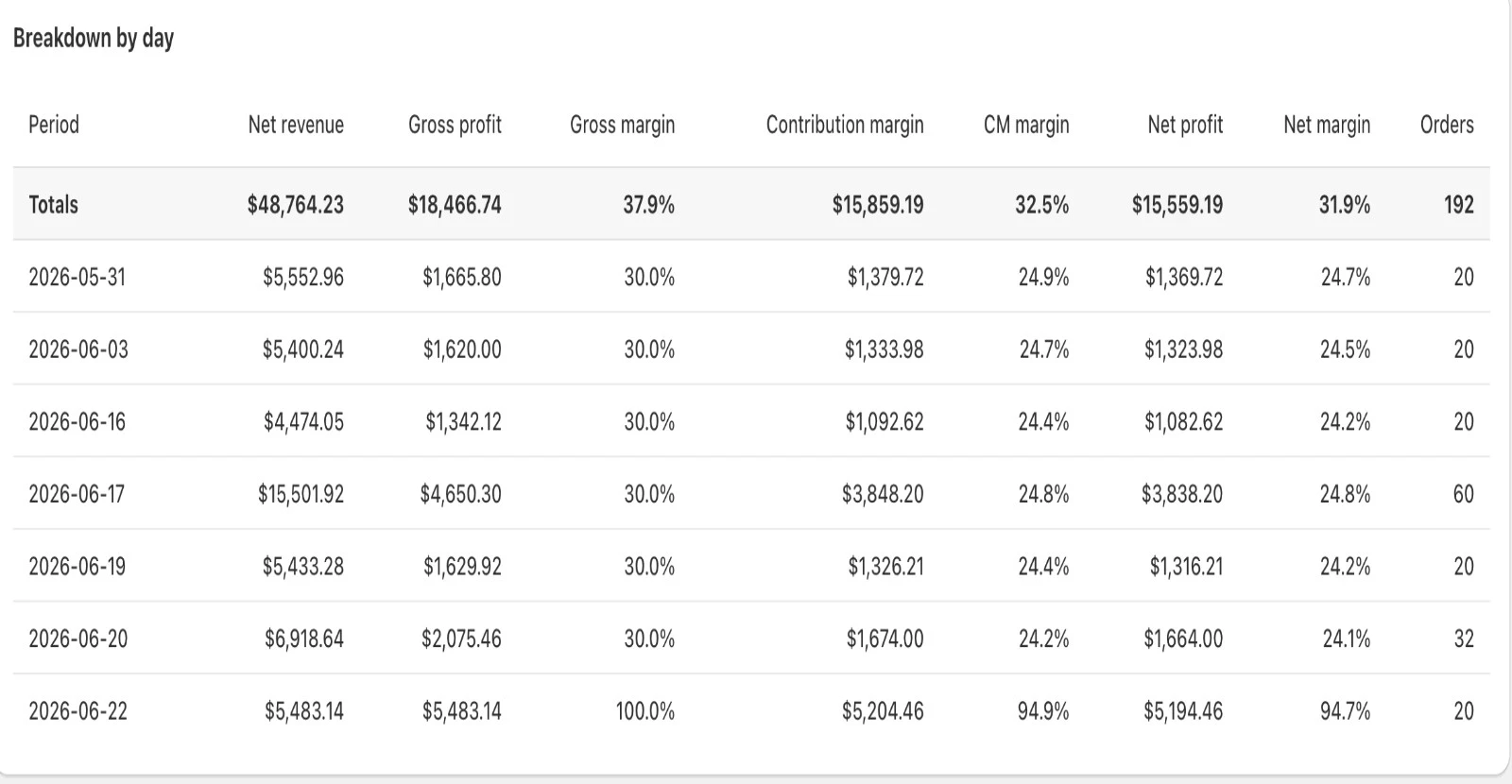
A live income statement, formatted like your accountant expects
The P&L page shows a full financial statement for the selected period — 7, 30, or 90 days depending on your plan. Net revenue at the top, then every cost line subtracted in order: COGS, shipping, transaction fees, payment processing, tax, ad spend, custom overhead. Each subtraction lands at a margin subtotal — CM1, CM2, CM3, CM4 — with both dollar amount and percentage.
The format is deliberately similar to a traditional income statement, so your accountant can read it without explanation. But unlike a spreadsheet P&L that takes days to build, this one updates with every order. No month-end close, no manual data entry.
In multi-rate tax jurisdictions, tax breaks out by rate slab automatically. Tax-inclusive pricing is backed out correctly. Multi-currency stores convert at daily exchange rates.
Take your P&L anywhere
The P&L isn't locked behind the app. Export in three formats depending on your plan. CSV gives you raw data for spreadsheets or BI tools. Excel includes two sheets — formatted summary and line-item detail with every order. PDF is a print-ready landscape report for email or board meetings.
CSV
All plansRaw data for spreadsheets, Google Sheets, or BI tools
Excel (2 sheets)
All plansSummary + line-item detail, formatted and ready to share
PDF (Landscape A4)
All plansPrint-ready P&L with branding, charts, and totals
Warnings that keep your numbers honest
A P&L is only useful if you trust it. NetNet surfaces warnings when something might affect accuracy — missing COGS, unresolved disputes, test orders, stale ad spend from a disconnected account. You always know when a number might be understated or stale.
Every question your accountant asks, answered in real time
A traditional P&L answers questions once a month, after a week of reconciliation. NetNet's P&L answers them as orders land. Every layer maps to a specific decision you'd otherwise be guessing on.
“Am I making money this month?”
CM4 — Net Profit. The bottom of the waterfall. The number that lands in your bank account after every cost. Updated with every order — no month-end wait.
“Is my pricing actually working?”
CM1 — Gross Profit %. Below 40% for most categories means you're underpricing or under-negotiating supplier costs. Per-SKU view in the Products page shows which products are dragging the average down.
“Am I losing money on certain orders?”
CM2 — Contribution Margin per order. The Orders page shows you every order's CM2 — and flags the ones that went negative once shipping, fees, and tax came out.
“Are my ads profitable, not just high-ROAS?”
CM3 — Marketing Profit. Subtracts ad spend from contribution margin. A 4× ROAS campaign can be a 0.8× POAS — CM3 catches this before you scale a money-loser.
“What's left after rent and payroll?”
CM4 — Net Profit. Configure custom overhead (rent, salaries, software, accounting). Each is prorated daily and subtracted at the CM4 layer. The real take-home.
“Is my margin improving or compressing?”
Side-by-side period comparison. This 30 days vs previous 30 days. Each margin layer shown with delta in points and percentage. Spot compression early — before it eats a quarter.
Last 30 days, previous 30, year-over-year
The P&L tells you when margins compress
You shouldn't have to stare at the P&L every day to catch margin erosion. NetNet surfaces shifts automatically — gross margin dropping below threshold, CM2 turning negative on too many orders, ad spend growing faster than revenue, missing data that might be hiding the real number.
Net margin below threshold
Net margin has been below your 5% threshold for 7 days. Review cost trends or adjust pricing.
Gross margin compression
CM1 margin dropped from 47.2% to 45.0% over the last 30 days. Likely supplier cost increase or discount strategy change. Check the Products page.
23 orders with missing COGS
These orders are inflating CM1 by approximately $4,800. Configure costs on the affected products to surface the real margin.
Ad spend growing faster than revenue
Ad spend up 24% over 30 days while revenue grew 12%. POAS compressing — review channel mix or creative fatigue.