Your daily command center
Most Shopify merchants start their day by checking revenue. But revenue doesn't tell you if you're making money. The NetNet dashboard shows you what actually matters — your true profit after every cost — updated automatically with every order.
For DTC founders and operators checking the business daily, with true profit rather than revenue as the first number of the day.
Available on all plans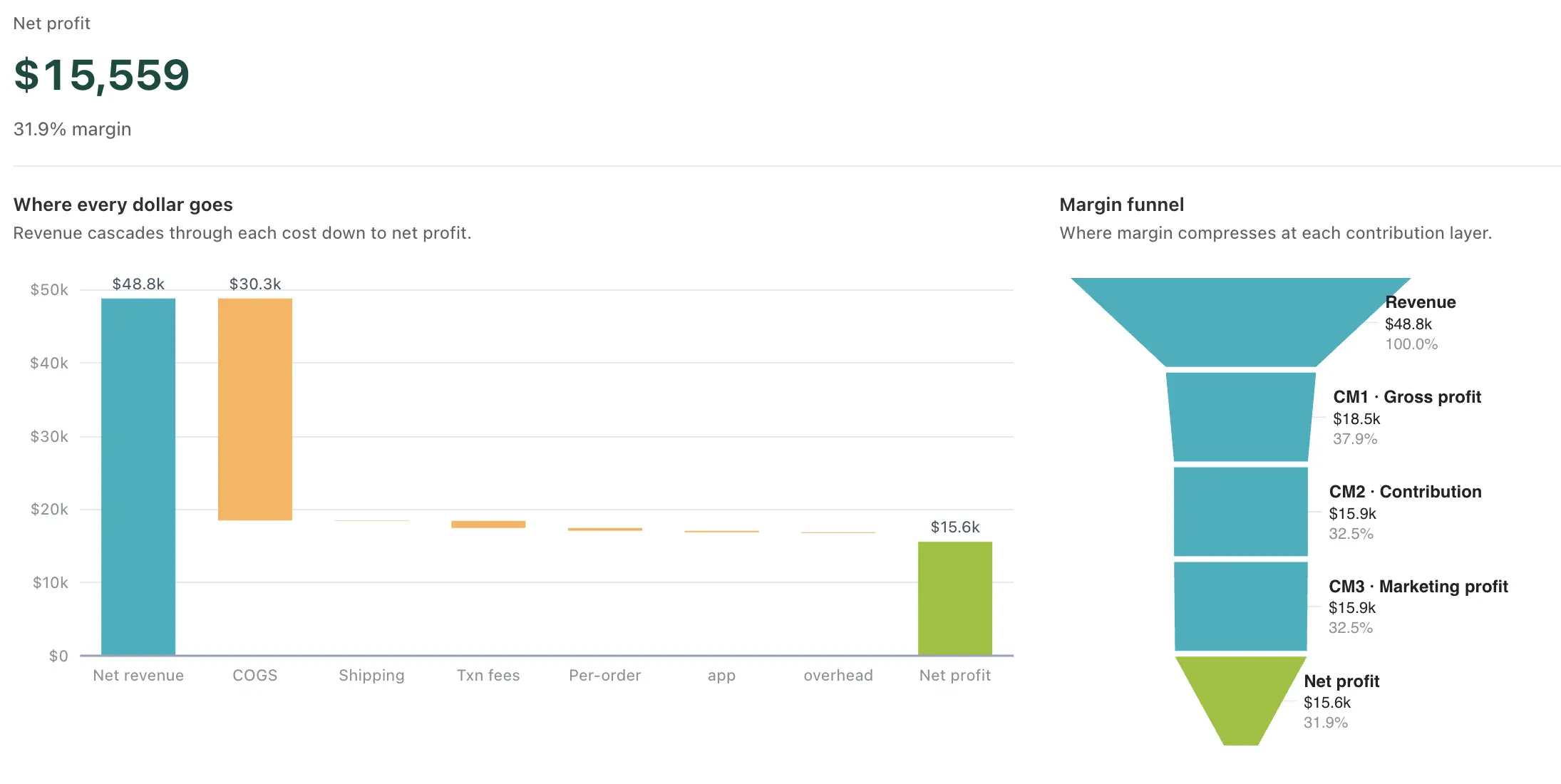
Every dollar, calculated the moment it lands
Orders flow in from your store. Ad spend syncs from every connected ad platform. Real shipping cost arrives from your carriers. Every cost is matched to the right order automatically — no copy-paste, no spreadsheet exports, no end-of-month reconciliation. When a new order lands, every metric on the dashboard recalculates within seconds.





Two rows, two stories
The top row is revenue: Revenue, Gross Profit, Net Profit, Orders. Each card shows the value for your selected period, the change vs the previous period, a margin or AOV secondary, and a 7-day sparkline. Read the four in a few seconds — no spreadsheet, no export, no wait for month-end.
The bottom row is cost: Ad Spend, COGS, Shipping, AOV. Same format, opposite color logic. A red delta on a cost card means costs grew (bad). Green means they shrank (good). Opposite of the revenue row on purpose, so a single glance separates "we sold more" from "we paid more."
Pick Today, Yesterday, last 7 / 30 / 90 days, or any custom date range — every metric updates with the comparison. Every paid plan sees the full 90 days.
See the gap between revenue and profit
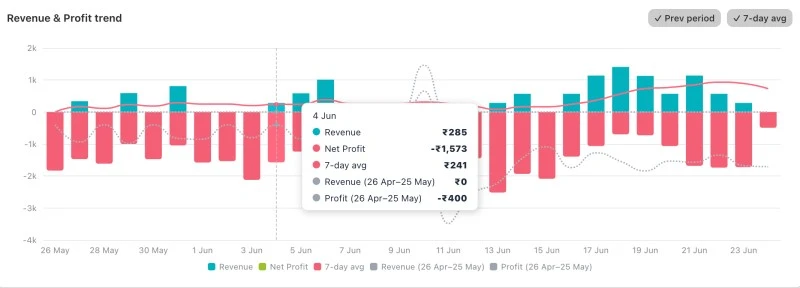
The main chart shows Revenue and Net Profit as two area lines over the selected period. The gap between the two lines is your total cost — if it's growing, costs are outpacing revenue. If it's shrinking, you're becoming more efficient.
The previous period overlays as dashed lines so this week vs last week is a glance, not arithmetic. No exports, no toggles — the comparison is the default.
Where every dollar actually goes
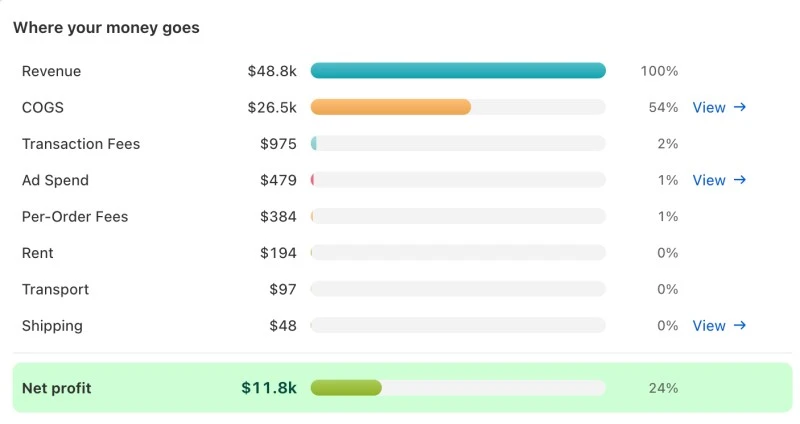
Cost categories ranked largest to smallest — COGS, shipping, gateway fees, ad spend, taxes, overhead. The order itself is the insight: the line at the top is where any optimization returns the most margin per hour you spend on it.
Built from your actual data — real ad spend from your connected platforms, real gateway fees per order, and real per-label shipping cost from your carrier when one is connected. Until then, shipping falls back to the manual flat or per-country rules you configure.
Beyond the trend and the cost mix, more questions answered
The trend chart and the cost breakdown above are the two views you'll come back to most. The five below sit beneath them on the same dashboard, each answering a question you'd otherwise need a spreadsheet to answer.
“Is each day profitable?”
Stacked bars per day: COGS, other costs, and net profit. Some days look great on revenue but terrible on profit.
“Are my margins improving?”
Gross and net margin % over time. Tells you if the business is getting healthier or slowly being squeezed.
“What percentage of revenue do I keep?”
Donut splits revenue into Net Profit, COGS, and Other. The center number is your net margin.
“Are orders trending up?”
Order count per day with an average reference line. Spot volume changes the revenue chart smooths over.
“Which days sell the most?”
Total revenue by weekday. Time promotions, ad spend, and restocking around your strongest days.
Today, this week, this month, and your unit economics
The dashboard includes four snapshot panels. The Today panel shows revenue, profit, and order count for the current day — updated in real time as orders come in, with a vs-yesterday comparison. The Week-to-Date and Month-to-Date panels do the same at the weekly and monthly level — comparing against the same point in the previous week or month, not the full prior period. MTD adds a progress bar plus projected end-of-month revenue and profit based on your current daily run rate.
The Efficiency panel surfaces the metrics most merchants never track but should: profit per order, COGS as a percentage of revenue, shipping cost percentage, gateway fee percentage, refund rate, and total discounts given. These numbers tell you whether your unit economics are healthy. A high refund rate might mean a product quality issue. A rising shipping percentage might mean you need to renegotiate carrier rates. A growing discount total might mean you're over-relying on promotions for acquisition.
The same screen tells you what to do next
Below the headline numbers, the same dashboard surfaces your customer mix (new vs returning, repeat rate, refund signal) next to your top and bottom SKUs ranked by gross profit. The numbers that point at what to do next aren't in a separate report — they're one scroll away.
Returning customers cost nothing to reacquire — that mix tells you whether the business is compounding or stuck on a paid-acquisition treadmill. Refund rate goes red above 5%, usually the earliest signal of a quality or fulfillment issue.
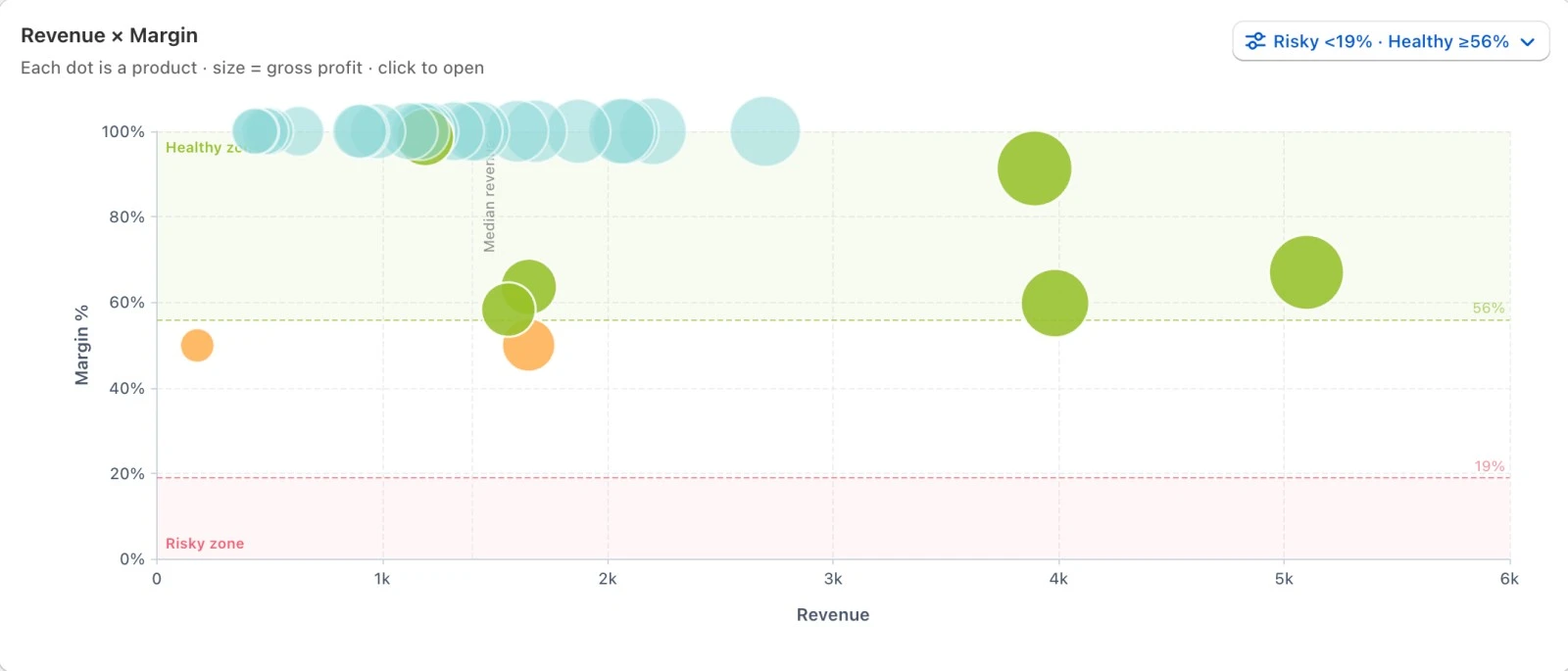
Top 5 and bottom 5 SKUs ranked by gross profit, not revenue. A revenue-leader at 22% COGS is less valuable than a quieter SKU at 60% — the ranking surfaces that without you having to calculate margins by hand.
The dashboard tells you when something needs attention
You shouldn't have to stare at charts every day to catch problems. The dashboard includes banner alerts that surface automatically when something needs your attention — missing COGS, stale ad data, margin drops below your threshold. They're specific, actionable, and dismissable. The goal is to make sure you never have a week where profit was silently eroding because of something you forgot to configure.
COGS not configured
23 products have no cost data — profit calculations are understated for orders containing these items.
Net margin below threshold
ProNet margin has been below your 5% threshold for 7 days. Review cost trends or adjust pricing.
Ad spend data stale
Meta Ads hasn't synced in 3 days. POAS calculations may be inaccurate. Check token expiry.
COGS and ad-stale alerts ship on every plan. Margin-threshold is on Pro. Alerts surface inline — nothing else to configure.
Connect your store; 90 days of history backfill while every new order updates the dashboard live.
What it calculates
Four profit layers, each one the previous layer minus a specific set of costs. Every deduction below is a line the calculator owns, so a layer can never disagree with the costs it is made of.
- Gross profit
- Cost of goods sold, with landed cost and effective dates per variant.
- Contribution margin
- Shipping, shipping tax, transaction fees, payment processing, checkout platform fees, per-order fees, per-item fees, tax on fees, chargebacks and taxes deducted.
- Marketing profit
- Ad spend, synced from Meta and Google.
- Net profit
- Overhead and custom cost heads you define, plus tax on overhead.
Figures are management-reporting figures computed from the costs you configure and the data your carriers, gateways and ad platforms report. They are not audited accounts.
Common questions
What does the profit dashboard calculate?
Four layers for any date range: gross profit after cost of goods, contribution margin after the variable costs of serving an order, marketing profit after ad spend, and net profit after overhead. Every layer reconciles to the cost heads listed on this page.
How often does it update?
Order data arrives by Shopify webhook as orders are placed and refunded. Ad spend syncs daily from Meta and Google. Shipping costs update when a carrier reports them, which for adjusted invoices can be days or weeks after delivery.
Where do the costs come from?
Cost of goods and custom cost heads come from what you configure. Shipping comes from your rules or a connected carrier. Payment and gateway fees come from the rates you set, including any tax charged on the fee. Ad spend comes from the connected ad accounts.
Is this the same as my accountant's P&L?
No. This is a management report using cash-basis conventions and simplified inventory treatment, built for operating decisions. A statutory P&L handles accruals, depreciation and reporting requirements that this does not attempt.
What if a cost is wrong on one order?
Cost of goods and shipping can be overridden on an individual order when the real figure differs from what the rules predicted — a split shipment, a one-off supplier price — without distorting the model for everything else.